Can You Read Books on a Tablet?
Yes, you can read books on a tablet through a compatible ebook or library app. Choose a device that supports your book source, then adjust the text and download books for offline reading.
On this page (8 sections)
- How do you read books on a tablet?
- Can you read books on a tablet without internet?
- Is a tablet comfortable for long reading sessions?
- Which of these tablets suits your reading habits?
- Can you read library books on a tablet?
- Should you use a tablet or an e-reader for books?
- What mistakes should you avoid when buying and using a reading tablet?
- Can you read books on a tablet, and which should you choose?
Yes, you can read books on a tablet using a compatible ebook or library app. A tablet is a useful choice if you want novels, illustrated books, browsing, and video calls on the same device.
Start with where you get your books, then choose the screen and accessories. App support matters more than extra memory or a faster processor if your main task is reading a chapter each evening.
How do you read books on a tablet?
Install a compatible reading app, sign in to your book account, and download a title from your library. Some services also let you read through a browser, though app downloads are often more useful away from home.
Follow this setup order:
- Check your bookstore or public library's supported devices and apps.
- Install the app from your tablet's app store and sign in.
- Open a sample or borrowed book before buying more titles.
- Set the font size, spacing, and page color.
- Find the bookmark, search, and download controls.
Keep your sign-in details somewhere secure. Using the same account helps you find your existing books, while creating a second account can make a collection appear to be missing.
Which book files can you read on a tablet?
EPUB books usually let text resize, while PDFs usually preserve the original page. That difference matters more for reading comfort than the file's name alone.
A novel with adjustable text can fit a smaller screen well. A scanned textbook or illustrated PDF may need a larger display because enlarging the page also means moving around it.
Don't assume every app opens every file. Books with account restrictions may require the original service's app even when another app supports the same basic format.
Can you read books on a tablet without internet?
Yes, downloaded books can work offline when the app supports it. Save the actual book, then briefly turn off Wi-Fi and confirm that it opens.
A cover visible in your app's library does not always mean the whole book is stored on the device. Download several chapters or titles before travel, rather than relying on a connection at your destination.
Syncing reading progress, borrowing another title, and using online dictionaries may still need internet access. Borrowed books also keep their loan deadlines when you are offline.
For more on what a tablet can do without a connection, see whether a tablet needs Wi-Fi to work.
Is a tablet comfortable for long reading sessions?
A tablet works best for long sessions when the text is easy to read and its weight is supported. A stand or folded case can make more difference than a small increase in screen size.
Match screen brightness to the room instead of leaving it at maximum. Angle the screen away from windows and lamps, and try a warm or dark page background if your reading app offers one.
Use our steps for making text bigger on a tablet before holding the screen closer. Larger text with a little extra line spacing can make a crowded page easier to follow.
An 11 in tablet gives fixed-layout pages more room, but it still needs to fit your bag and reading position. Our guide to what size tablet to buy for reading and calls helps weigh that tradeoff.
Silence notifications during a chapter and change position during longer sessions. A low-blue-light feature does not replace sensible brightness, room lighting, or breaks.
Which of these tablets suits your reading habits?
Choose the Fire HD 10 for leisure reading, Lenovo Idea Tab 11 for study, or Galaxy Tab A11+ for shared home use. Confirm your reading app works on your chosen device before committing to it.
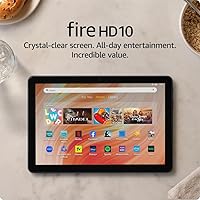
Amazon Fire HD 10: for books and browsing
The Fire HD 10 suits readers who want books alongside web browsing and email. This configuration has 4 GB of RAM and 32 GB of storage, enough reason to plan what you keep downloaded if you also save photos.
It supports a microSD card of up to 1 TB, sold separately, but check whether your reading app can save downloads there. Extra card space does not automatically move every app or book off internal storage.
Amazon claims up to 13 hours of battery life; your settings and activities affect the time between charges. Its optional stylus is a separate purchase, so skip it if you only need page turns, bookmarks, and typed notes.
Choose it for leisure use once your essential reading services are confirmed. Skip it if your library or study app does not support it, or if an included pen and stand are priorities.
Lenovo Idea Tab 11: for reading and study notes
The Idea Tab 11 suits students and readers who move between books, reference pages, and handwritten notes. Its 256 GB of storage gives you room for course files as well as a reading collection.
The included Tab Pen adds a reason to choose it if you write study notes. Handwriting inside a particular ebook still depends on that app's tools and permissions.
The folio's stand helps with desk reading, but the tablet weighs 1.1 lb before the case. Skip it if you mainly want to hold novels one-handed or have no use for the pen.
For a closer look at study needs, see the best tablets for note taking.
Samsung Galaxy Tab A11+: for a shared household tablet
The Galaxy Tab A11+ suits a home where reading shares time with browsing, photos, and video calls with family. The selected configuration has 6 GB of RAM, rather than the higher-memory options available in the range.
Consider its quad Dolby Atmos speakers if games are part of your routine between reading sessions. For plain ebooks, though, audio features should come after app support and comfortable text.
Samsung's fast-charging feature requires a compatible 25W wall charger sold separately. Include that accessory in your buying decision if you do not already have a suitable charger.
Choose it for mixed family use rather than reading alone. Skip it if your priority is a dedicated book device or an included pen-and-folio package.
For storage guidance, read how much storage you need on a tablet. To compare more reading options, see the best tablets for reading.
Can you read library books on a tablet?
Often, yes, provided your library's ebook service supports the tablet. Check its borrowing instructions before buying a device, because library access varies by service and location.
You may need a library card number and PIN as well as an app account. Follow your library's sign-in route so you reach its collection rather than a separate bookstore.
Borrow one available title and practice downloading, opening, and returning it. Loan limits, waiting lists, and renewal rules affect your reading routine even when the tablet itself works well.
Keep library loans separate from books you buy. A borrowed title can disappear when its loan ends, and renewing it may depend on whether another reader is waiting.
Should you use a tablet or an e-reader for books?
Choose a tablet for color pages and several daily tasks; consider an E Ink e-reader for a device centered on books. Your usual reading place should guide the choice.
Tablets suit illustrated books, reference material, and switching between reading and notes. Their app notifications can also interrupt you unless you silence them.
Many E Ink readers suit bright outdoor reading and use less power between page changes. Check individual models for book formats, screen lighting, and library support rather than assuming all e-readers work alike.
If you are still deciding whether a tablet suits your routine, our guide to tablets for older adults and home use covers common home tasks. For a narrower comparison, start with the best tablets for reading.
What mistakes should you avoid when buying and using a reading tablet?
Avoid buying for spare storage or accessories before checking book access. A tablet that opens your existing collection is more useful than one with features you will rarely use.
Don't choose by screen size alone, either. Check resolution for detailed pages and consider how you will support the tablet while reading in bed or on a sofa.
For care, remove dust with a soft microfiber cloth and follow the device's cleaning directions. Avoid spraying liquid directly onto the screen or charging port.
Keep the reading app and tablet software current, and check account sync before replacing or resetting a device. Annotations stored only locally may need a separate backup or export.
Can you read books on a tablet, and which should you choose?
Yes, you can read books on a tablet, and your book source should decide the shortlist. Then choose around the way you spend time reading.
Pick the Fire HD 10 for leisure reading once app compatibility is confirmed. Choose the Lenovo Idea Tab 11 for reading with study notes, or the Galaxy Tab A11+ for a household device that also handles browsing and video calls with family.
Before ordering, check one familiar title, the app it needs, and your preferred reading position. Use the best tablets for reading to compare options against those needs.
Frequently asked questions
Can you read books on any tablet?
Most tablets can read ebooks, provided they support the app or browser service your books require. Check your bookstore and library service before buying, especially if you already have a digital collection.
A book file's format and account restrictions can affect which apps will open it.
Is reading on a tablet the same as reading on an e-reader?
Both display ebooks, but a tablet suits reading alongside other apps, while a dedicated e-reader centers on books. Many e-readers use E Ink screens, which suit reading in bright daylight.
Tablets offer color screens for illustrated pages and other tasks, so choose around what and where you read.
Can you read books on a tablet without Wi-Fi?
Yes, downloaded books can work without Wi-Fi when the reading app supports offline access. Save each title inside the app, then briefly turn off Wi-Fi and open it before leaving home.
Library loans still expire, and syncing your reading position across devices usually needs an internet connection.
Can you make the text bigger when reading on a tablet?
Yes, most apps let you enlarge text in reflowable ebooks, where words rearrange to fit the screen. PDFs and some illustrated books keep a fixed page layout, so you may need to zoom and pan instead.
Adjust the reading app's font controls before changing the tablet's wider accessibility settings.