5 Best Lenovo Tablets (October 2026)
The best Best Lenovo tablets for everyday use include the Lenovo Idea Tab 11 for everyday use, the Lenovo Idea Tab Plus for tabletop viewing, and the Lenovo Idea Tab Pro for document-heavy study.
On this page (10 sections)
- Which is the best Lenovo tablet for your daily routine?
- How should you choose a Lenovo tablet screen size?
- How much storage should your Lenovo tablet have?
- Which Lenovo tablet features matter for handwritten notes?
- Can one of these Lenovo tablets replace your laptop?
- How should you compare battery life and charging?
- What should you set up before everyday use?
- How can you care for the tablet and its pen?
- Which mistakes should you avoid when choosing a Lenovo tablet?
- Which Lenovo tablet should you pick?
The Lenovo Idea Tab 11 is the best Lenovo tablet for most people here because it balances everyday screen space, useful storage and included accessories. Choose the Plus for tabletop viewing, the Pro for document-heavy study, or the Tab One when easy carrying comes first.
Start with the job you'll do most often. A tablet for reading in bed needs a different shape and size from one used to mark lecture slides at a desk.
For a broader brand overview, read Is a Lenovo Tablet Good?. If you're comparing Android tablets across brands, our best Android tablets for everyday use guide covers more options.
Our picks at a glance
-
1
-
2

-
3
Which is the best Lenovo tablet for your daily routine?
The Idea Tab 11 is the safest starting point for mixed home use, while the other picks serve more specific needs. Decide first whether you need easier carrying, more document space or a pen for regular writing.
CheeryDeck compared screen size, storage, processors and included accessories against those uses. Battery figures below are Lenovo's rated battery life claims, which help with planning but don't predict a full day of mixed work.
| Product | Best for | Display | Storage | Included | Our score |
|---|---|---|---|---|---|
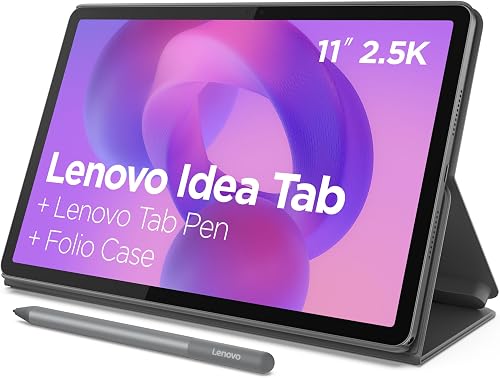
| Lenovo Idea Tab 11 | everyday use | 11 in 2.5K IPS, 90 Hz | 256 GB | Lenovo Tab Pen and folio case | 8.0 |
| Lenovo Idea Tab Plus | tabletop viewing | 12.1 in 2.5K IPS, 90 Hz | 128 GB | Lenovo Tab Pen and folio case | 7.7 |
| Lenovo Idea Tab Pro | document-heavy study | 12.7 in 3K LCD, 90 Hz | 128 GB | Lenovo Tab Pen Plus and folio case | 7.6 |
| Lenovo Tab One | light travel | 8.7 in HD, 60 Hz | 64 GB | Folio case | 7.2 |
| Lenovo Idea Tab 11 with Pen | occasional handwritten notes | 11 in 2.5K IPS, 90 Hz | 128 GB | Lenovo Tab Pen | 6.8 |
Why is the Idea Tab 11 the best Lenovo tablet for most people?
The Idea Tab 11 makes sense when you want one tablet for several jobs rather than a device built around a single task. It leaves room for handwriting and web browsing without moving into the largest sizes here.
Lenovo Idea Tab 11
- 11 in 2.5K IPS display
- 256 GB storage
- Lenovo Tab Pen and folio case included
- Up to 12 hours of rated battery life, according to Lenovo
The most balanced choice here for notes, browsing and saved photos. Its included writing and viewing accessories make it a useful starting package.
Pros
- Most built-in storage in this group
- Pen and stand case included
- Screen size suits mixed tasks
Cons
- Less portable than the Tab One
- Less document space than the Plus and Pro
Its 256 GB of built-in storage is the main reason to choose this bundle over the other medium-size option. That extra room suits saved photos, course files and apps that need to stay on internal storage.
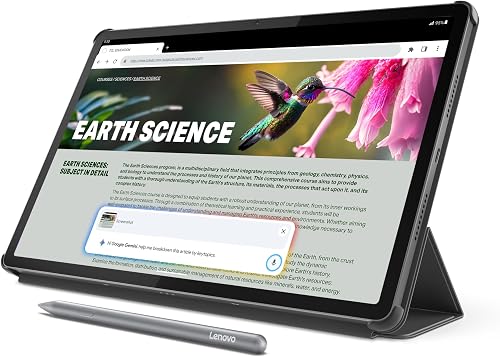
The 11 in 2.5K IPS screen runs at 90 Hz, paired with a MediaTek Dimensity 6300 processor and 8 GB memory. The included Tab Pen and folio let you move between writing and supported viewing without choosing those accessories separately.
For schoolwork, start with a simple routine: import the document, mark it up, then export a copy to your usual file folder. Supported learning apps include Squid, Nebo and MyScript Calculator, but you don't need to use every app to benefit from the pen.
Buy it for a mixed routine of reading, notes, browsing and games. Skip it if your main need is a small travel reader or a large screen for full-page documents.
For more detail on this model, see our Lenovo Idea Tab 11 review.
Who should buy the Lenovo Idea Tab Plus?
The Idea Tab Plus suits buyers who usually place their tablet on a table, desk or stand. Its larger screen is useful for recipes, family photos and notes that feel cramped on a smaller device.
Lenovo Idea Tab Plus
- 12.1 in 2.5K IPS display
- 128 GB storage
- Lenovo Tab Pen and folio case included
- Up to 13 hours of rated battery life, according to Lenovo
A roomy choice for photos, recipes and handwritten notes at a desk. Choose it when viewing space matters more than extra built-in storage.
Pros
- More screen space than the 11 in models
- Pen and stand case included
- Quad Dolby Atmos-tuned speakers
Cons
- Half the top pick's built-in storage
- Larger footprint for bags and small tables
The 12.1 in display gives content more physical room, though its 2.5K resolution matches the top pick. Bigger pages don't mean more pixels here, so choose it for viewing size rather than an increase in fine detail.
A Dimensity 6400 processor and 8 GB memory accompany 128 GB storage. The pen and folio are included, along with quad Dolby Atmos-tuned speakers.
This is the middle path for someone who wants a roomy work surface without choosing the largest model. A folio stand also lets you keep the screen upright while referring to a recipe or reading an email.
Buy the Plus when you'll use that extra space daily. Skip it if most sessions involve holding the tablet in one hand or if keeping a large offline library matters more than display size.
Who should choose the Lenovo Idea Tab Pro?
The Idea Tab Pro suits students and readers who work with dense pages, diagrams and long documents at a desk. It offers the largest and highest-resolution screen in this group.
Lenovo Idea Tab Pro
- 12.7 in 3K LCD display
- 128 GB storage
- Lenovo Tab Pen Plus and folio case included
- Wi-Fi 6E support
The largest work area here suits textbook pages, diagrams and document annotation. Its size makes more sense on a desk than in a hand for long reading sessions.
Pros
- Largest and highest-resolution display here
- Tab Pen Plus and folio included
- Quad JBL Dolby Atmos speakers
Cons
- Less built-in storage than the top pick
- Large body for handheld reading
Its 12.7 in 3K LCD gives a full-page document more room before you need to zoom. The Dimensity 8300 processor, 8 GB memory and Wi-Fi 6E support round out a package aimed at study and everyday browsing.
The included Tab Pen Plus helps with annotating course materials and screenshots, while the folio supports viewing. Mono and chromatic reading modes offer different ways to display reading material; choose the one that keeps text easiest to follow.
This model has 128 GB storage, so a larger screen doesn't bring a larger built-in file allowance. Keep course folders tidy and move finished work into a backed-up archive rather than leaving every download on the tablet.
Buy it for regular document work, especially if a laptop already handles your typing and specialist software. Skip it if you mainly want a casual ebook reader or a screen to carry between rooms.
Is the Lenovo Tab One the right compact choice?
The Tab One is the right pick when carrying and holding the tablet matter more than a large workspace. It suits casual ebooks, browsing and email better than dense study pages.
Lenovo Tab One
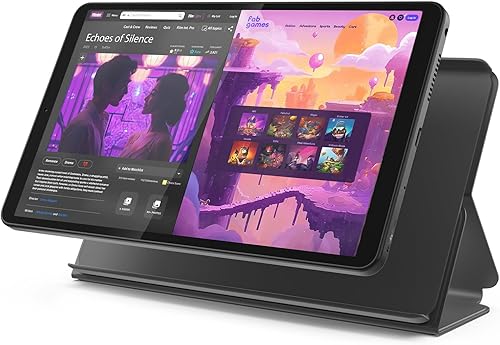
- 8.7 in HD display
- 64 GB storage
- 11.2 oz weight
- Folio case with built-in stand
A compact option for ebooks, casual browsing and email away from a desk. Choose it for easy carrying rather than dense documents or handwritten study notes.
Pros
- Lightest stated weight in this group
- Small footprint for carrying
- Stand case included
Cons
- Least built-in storage here
- Lower display resolution than the other picks
- No included pen
The 8.7 in HD screen and 11.2 oz weight make it the smallest option here. Its folio includes a stand, so compact size doesn't mean you must hold it throughout a reading session.
A Helio G85 processor, 4 GB memory and 64 GB storage suit a simpler routine with fewer large apps and downloads. Its 60 Hz screen has a resolution of 1340 x 800, making the larger Idea Tab models better choices for fine document detail.
For children, it includes Google Kids Space and supports parental controls through Family Link. An adult should still choose allowed apps, review permissions and set limits before handing over the device.
Buy it for easy packing and light reading. Skip it for pen-based coursework, frequent document annotation or a large offline photo collection that you don't want to manage often.
When does the Lenovo Idea Tab 11 with Pen make sense?
The Idea Tab 11 with Pen fits buyers who want a medium-size writing tablet but don't need the top pick's storage allowance. It is most relevant when you already have a plan for storing large files elsewhere.
Lenovo Idea Tab 11 with Pen

- 11 in 2.5K IPS display
- 128 GB storage
- Lenovo Tab Pen included
- 90 Hz refresh rate
An alternative for buyers who want a medium-size writing screen and keep most large files elsewhere. Its included pen uses a replaceable AAA battery.
Pros
- Pen included
- Same display resolution as the top pick
- 8 GB RAM
Cons
- Half the top pick's built-in storage
- Pen needs a replaceable AAA battery
- Folio case inclusion is unconfirmed
It pairs 128 GB storage with 8 GB RAM and a Dimensity 6300 processor. Its screen matches the top pick's size, resolution and refresh rate, so the main choice is about the package rather than a different viewing format.
The included Lenovo Tab Pen supports 4,096 pressure levels and tilt, and uses a replaceable AAA battery. Those controls are useful for varied pen strokes, but neat notes still depend on your app, writing size and page layout.
This configuration includes Android 15, Dolby Atmos speakers and Smart Connect for sharing files with other devices. Confirm the exact bundle contents before ordering if you need a folio case as well.
Buy it for occasional handwritten notes and ordinary app use. Skip it if you want the more complete pen-and-case package or expect your internal storage needs to grow.
How should you choose a Lenovo tablet screen size?
Choose by how you'll support the tablet, then by what you'll read on it. Handheld use favors compact models, while a desk or stand makes a larger screen easier to use.
For ebooks, think about your hands as well as the text
Adjustable ebook text works well on a small screen because the words can flow onto a new page. Magazines, scanned books and fixed-layout PDFs are less flexible, so they often benefit from more display space.
A larger tablet also becomes a larger object to hold through a long chapter. If you read in bed, plan how you'll support it rather than choosing by screen size alone.
Our best tablets for reading guide can help you compare these reading habits.
For documents, leave room for notes
A useful study screen must fit both the material and your writing. If you often zoom into a diagram, add a note and zoom back out, a larger work area can reduce that back-and-forth.
Measure the place where you'll use it, including the folio stand's footprint. A tablet that fits your bag can still crowd a small classroom desk.
For recipes, consider viewing distance
A nearby screen doesn't need to be as large as one across a kitchen counter. Place a book or piece of paper where the tablet will sit to judge the distance and available space.
Screen size also won't solve glare from a window behind you. Changing the tablet's angle or your seat can help more than turning brightness up.
How much storage should your Lenovo tablet have?
Choose internal storage for apps and the files you need ready all the time. Use removable storage or cloud folders for suitable files you can move, archive or download again.
Someone who browses at home and keeps a few books needs less local space than a traveler saving a large photo collection. School use can also grow beyond notes once you add scanned readings, diagrams and large presentation files.
Don't plan to fill the advertised capacity completely. The operating system and apps use space, and downloads or app updates need working room.
The top pick, Plus, Pro and Tab One support microSD storage. A card can help with compatible files, but it doesn't replace internal storage for every app or every app's downloads.
Cloud storage has a different limit: you may need an internet connection before opening a file that isn't saved locally. Mark essential documents for offline access and check that they open before leaving home.
For a fuller estimate, use our tablet storage guide. Base your choice on the library you'll keep, not just the files you have today.
Which Lenovo tablet features matter for handwritten notes?
The most useful features are a compatible pen, enough writing room and reliable file export. Choose those before making AI tools or long app lists the reason to buy.
Match the writing surface to your notes
Short reminders need little space, but equations, diagrams and annotated slides need more. Think about whether you write on a blank page or around material already on the screen.
The pen-equipped picks above suit those tasks, while the Tab One is the simpler reading and browsing option. Don't assume a generic touch stylus will provide the same controls as a compatible active pen.
Build one notebook system
Pick one main note app and learn its folders, search and export tools. Keeping different classes or projects across several apps makes later revision harder.
Create a sample page, export it as a common file type and open it on another device. That confirms you can keep your work useful beyond the app where you wrote it.
Treat AI features as helpers
Circle to Search can help you look up unfamiliar material, and AI tools can help organize ideas. Check important answers against your course materials before adding them to notes.
For regular study, a dependable save-and-backup routine matters more than having every assistant feature switched on. Our best tablets for note taking guide covers other ways to match a tablet to your writing habits.
Can one of these Lenovo tablets replace your laptop?
A Lenovo tablet can cover reading, email, video calls with family and some document work, but check your required software first. A larger screen or included pen doesn't make a mobile app work like its desktop version.
Write down the tasks you must complete, including submitting assignments, joining calls and editing shared documents. Then check the exact apps or browser tools those tasks require.
Long writing sessions also need a comfortable keyboard setup. None of these packages includes a keyboard, so account for that separately if you plan to type essays or reports.
Specialist course software, complex spreadsheets and detailed file management may still favor a laptop. Read Can a Tablet Replace a Laptop? before buying the Pro mainly as a computer replacement.
For many students, the strongest arrangement is a tablet for reading and pen notes alongside an existing laptop for longer work. That lets you choose the tablet for its actual role.
How should you compare battery life and charging?
Use Lenovo's rated battery life figures as single-task reference points, then plan around your own workload. High brightness, video calls, games and background activity can change how long a charge lasts.
Lenovo quotes rated battery life of up to 12 hours for the top pick, 13 hours for the Plus, 11 hours for the Pro and 12.5 hours for the Tab One. These figures don't establish the same order for mixed daily use.
A useful travel plan includes access to power as well as a full battery. Downloading material in advance can also reduce your need to open online files over an unreliable connection.
The Plus and Pro support 45W fast charging. Don't assume that a charging cable means a matching power adapter is included, and use a compatible adapter if you want the supported charging rate.
At home, choose a charging spot with airflow and enough cable slack. Avoid leaving the tablet under bedding or pulling a tight cable across the edge of a table.
What should you set up before everyday use?
Set up security, backups and your main apps before filling the tablet with downloads. A short first-day routine prevents avoidable problems with access and lost work.
- Connect to trusted Wi-Fi and check for updates. Allow time for available system and app updates before a class or trip.
- Set a screen lock and recovery options. Make sure you can recover the account without relying only on the tablet itself.
- Install your essential apps first. Confirm that school, reading and family video call apps work before adding optional apps.
- Adjust text size and brightness. Aim for comfortable reading in your usual room rather than maximum brightness everywhere.
- Set up file backup. Save a sample note and confirm it appears where you expect on another device.
- Prepare offline material. Open saved books, photos or documents without a connection to check they're ready.
For a shared family tablet, agree on who can install apps and make account changes. Set parental controls before giving a child access, rather than trying to rebuild the setup afterward.
Keep the home screen simple if the tablet is for someone who prefers a few familiar tasks. A clear row of reading, calling and email apps is easier to use than several crowded pages.
How can you care for the tablet and its pen?
Protect the screen, keep the charging port clean and avoid heat during use and charging. A folio is useful for carrying and propping up the tablet, but it doesn't make the device waterproof or drop-proof.
Use a soft microfiber cloth for routine cleaning. For a damp clean, follow Lenovo's care guidance and keep moisture away from ports and openings.
Before closing a folio, check for grit or small objects against the screen. Carrying keys or loose hard items beside the tablet can also cause avoidable damage.
Keep the pen tip clean and replace a worn or damaged tip with a compatible part. Don't press harder to make faint strokes darker; check the app's pen settings first.
For the AAA-powered pen in the final pick, keep a suitable spare battery available if you rely on it away from home. Follow the pen's instructions for battery replacement and longer storage.
Back up important notes regularly and remove downloads you no longer need. Care includes protecting the work on the tablet, not just its glass and case.
Which mistakes should you avoid when choosing a Lenovo tablet?
The biggest mistake is buying for a feature you rarely use while overlooking a daily limit. Screen size, storage and software fit have more effect on everyday use than a long feature list.
Don't buy the largest tablet just because it sounds more capable. It can be the wrong choice for bedtime reading, small bags or frequent handheld use.
Don't assume similar names mean identical bundles. The two Idea Tab 11 choices differ in storage and confirmed accessories, which changes what you need to add.
Don't confuse memory with storage. Memory helps the tablet manage active apps; storage holds your apps, downloads and files.
Don't choose a tablet around a promised workflow before checking the app. School portals, document editors and email apps can have different mobile limits.
Finally, don't make AI features your main buying reason. A tablet that fits your hands, files and routine will be more useful than one chosen for tools you rarely open.
You can also use our Lenovo vs Samsung tablet comparison to judge whether another brand better fits that routine.
Which Lenovo tablet should you pick?
The best Lenovo tablet is the one that removes your main daily limit. Choose the Idea Tab 11 for a flexible mix of tasks and a larger local library, or the Plus if your tablet usually stays on a stand.
Pick the Pro when full-page documents and pen annotation are central to your work. Choose the Tab One for easy carrying, or the Idea Tab 11 with Pen when occasional handwriting and a smaller file collection fit your needs.
Before ordering, name your 3 most common tasks and where you'll do them. That short check will tell you more than choosing by model name alone.
If you're still deciding between brands, our Lenovo and Samsung tablet comparison is the useful next step.
Our top 3 picks at a glance
-
1
-
2
-
3
Frequently asked questions
Which Lenovo tablet is best for most people?
The Lenovo Idea Tab 11 is the best fit for most people here because it balances screen size, storage and included accessories. It suits a mix of notes, browsing and reading.
Choose another model when small-bag carry or a larger document workspace matters more than that balance.
Which Lenovo tablet has the largest screen here?
The Lenovo Idea Tab Pro has the largest screen here, measuring 12.7 in with 3K resolution. It suits documents, diagrams and desk-based study.
The Idea Tab Plus is a slightly smaller alternative.
For long handheld reading sessions, consider how you'll support the tablet as well as the screen size.
Is a Lenovo tablet with a pen useful for note taking?
Yes, a compatible pen is useful for handwritten notes, sketches and marking documents. Choose an app that lets you organize and export your work, then set up backups before building a large notebook.
Screen size matters too: leave room for your hand without making the tablet awkward to carry.
Is the Lenovo Tab One good for travel?
The Lenovo Tab One suits light travel because its 8.7 in screen and 11.2 oz weight make it easy to pack. Its included folio provides a viewing stand.
Download your books or documents before leaving Wi-Fi, and check available storage before saving a large offline library.