Lenovo Idea Tab 11 Inch Review: Worth It? (October 2026)
This Lenovo Idea Tab review recommends the Idea Tab 11 for handwritten notes, home reading, and photos. Choose it for the included pen, folio, and generous storage; choose a smaller tablet for long handheld reading.
On this page (11 sections)
- What does this Lenovo Idea Tab review recommend?
- How useful is the screen for reading and study?
- Is it comfortable for everyday home use?
- How useful are the included pen and study apps?
- How much storage and connection planning do you need?
- What should you expect from battery life and sound?
- How do the Lenovo alternatives change the decision?
- How should you set up and care for the Idea Tab?
- What buying mistakes should you avoid?
- Can the Lenovo Idea Tab 11 replace a laptop?
- Lenovo Idea Tab review: which model should you choose?
This Lenovo Idea Tab review recommends the Idea Tab 11 for notes, reading, and saved photos when you mostly use a tablet at a desk or on its stand. Its included writing accessories and generous storage make it a useful study companion.
Skip it if your main goal is holding a small screen in one hand for long stretches. The key choice is between room to work and ease of carrying, rather than buying the largest display available.
What does this Lenovo Idea Tab review recommend?
The Idea Tab 11 is the strongest all-round choice here for someone who wants handwritten notes alongside everyday browsing. CheeryDeck gives it 8 out of 10 for that mix of uses, with carrying comfort and desktop work as its main limits.
Lenovo Idea Tab 11
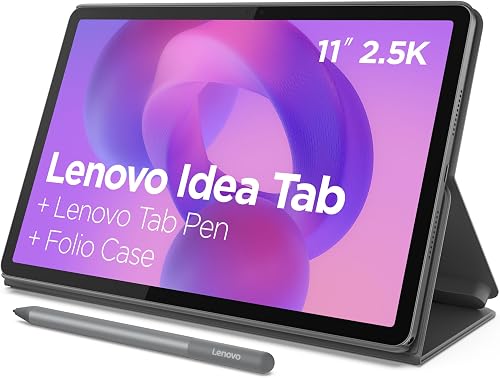
- 11 in 2.5K IPS display
- 8 GB memory and 256 GB storage
- Lenovo Tab Pen and folio case included
- 90Hz refresh rate
A balanced choice for handwritten notes, saved photos, and reading at a desk. The included pen and folio make it easier to build a writing and reading setup.
Pros
- Pen and folio case included
- High-resolution 11 in display
- 256 GB storage
- microSD support
Cons
- Less compact for handheld reading
- No physical keyboard included
The MediaTek Dimensity 6300 processor and 8 GB of memory provide the hardware for running your study and everyday apps. They do not establish how a demanding game or specialist app will perform, so check those requirements before buying.
The main reason to choose this package is that its parts serve the same routine: write notes, keep files nearby, then prop up the screen for reading or video calls with family. You don't need to start by choosing a separate pen and cover.
Students who type most assignments should still plan around a keyboard or laptop. A pen is useful for diagrams, calculations, and annotations, but it does not make long typing sessions easier.
Lenovo Idea Tab review: who should skip it?
Skip the Idea Tab 11 if compact reading or desktop software is your priority. Its study tools make more sense when you regularly write by hand or work with documents on a table.
Also skip it if a required school or work app lacks the features you need on a tablet. Check file formats, assignment uploads, and any exam software before making it your main study device.
How useful is the screen for reading and study?
The 11-inch, 2560 x 1600 IPS display suits documents, articles, and photos, while its 90Hz refresh rate supports smoother scrolling. The 16:10 shape gives you a wide view in landscape and a tall page in portrait.
For books with adjustable text, screen size is only part of comfort. Increase the font and line spacing before deciding that you need a larger tablet; our guide to making text bigger on a tablet covers common controls.
PDFs need more thought because their page layout often stays fixed. A dense textbook page may still require zooming, especially when it includes small labels, tables, or handwritten marks.
Try a page from the kind of document you read most often on a similarly sized screen. Check whether you can read the main text and write a margin note without constant zooming.
Lenovo includes TÜV Rheinland Low Blue Light hardware features, but those are not a reason to ignore room lighting or breaks. Keep the screen at a comfortable brightness and avoid placing a bright window directly behind it.
Is it comfortable for everyday home use?
The folio stand makes the Idea Tab 11 better suited to supported use than prolonged one-handed holding. At 1.1 lb before accounting for the case, it is a bag-sized device for moving between rooms or taking to class.
Place it on a stable table for recipes, reading, or video calls with family. Check the stand's position before writing so the tablet does not shift as you press on the screen.
For reading in bed, think about where the weight will rest. A compact model may be easier to hold, while the Idea Tab makes more sense on a secure support.
Our guide to tablets for older adults and home use covers choosing around daily routines. If calls matter, the guide to video calling on a tablet explains app setup, camera position, and connection quality.
How useful are the included pen and study apps?
The Lenovo Tab Pen is a reason to buy this model if handwriting is already part of your routine. Use it for lecture outlines, diagrams, math work, or marking passages you want to revisit.
Lenovo highlights Lenovo AI Note, Squid, Nebo, and MyScript Calculator among its learning tools. Choose one main note app first, rather than scattering classwork across several apps with different filing systems.
Create a notebook for each course or project, then use clear dates and page titles. Before storing important work, confirm that you can export a note in a format you can open elsewhere.
Circle to Search with Google lets you circle an on-screen item with the pen or your finger to search or translate it. That can help with an unfamiliar term, but check the source before copying an answer into your notes.
Read through AI-generated summaries and rewritten text against the original material. Keep your source notes so you can correct missing context or an inaccurate explanation.
For more choices built around handwriting, compare our tablets for note taking. Focus on your preferred app and workflow before choosing a device mainly because it includes a pen.
How much storage and connection planning do you need?
The 256 GB of built-in storage is a strong reason to choose the Idea Tab 11 if you keep downloaded books, photos, and documents. It also supports microSD, though a memory card and a backup serve different purposes.
Keep a second copy of important notes and photos somewhere separate from the tablet. A card inside the same device does not protect those files if the tablet is lost.
Check which files your apps allow you to move to a card. Do not assume that adding microSD will expand space for every app or its downloads in the same way.
Our tablet storage guide can help you estimate your needs. Start with the photos and large files you intend to keep, since those can matter more than a collection of text notes.
The tablet supports Wi-Fi and Bluetooth. Before traveling, download the material you need, open it once, and confirm it works without a connection; some apps require a sign-in or limit offline access.
What should you expect from battery life and sound?
Plan around your own workload rather than the maximum battery figure. Lenovo claims up to 12 hours of video playback for the Idea Tab 11, but that does not establish a full day of mixed study use.
Brightness, wireless activity, and the apps you run can change how long a charge lasts. Start an important class or trip with enough charge, and leave room in your bag for charging gear.
Lenovo describes 20W charging for this model, while the included components name a USB-C charging cable. Confirm the power adapter supplied with your exact bundle before counting on a complete charging setup.
The model also has four Dolby Atmos-tuned speakers, which may matter if family calls are part of your routine. In shared spaces, use headphones and keep volume low enough that you can hear what is happening around you.
How do the Lenovo alternatives change the decision?
Choose the Idea Tab Plus for more document space or the Tab One for easier carrying. The Idea Tab 11 sits between them in screen size and offers the most built-in storage of these configurations.
| Model | Display | Built-in storage | Weight | Included accessory |
|---|---|---|---|---|
| Lenovo Idea Tab 11 | 11 in, 2560 x 1600 | 256 GB | 1.1 lb | Tab Pen and folio case |
| Lenovo Idea Tab Plus | 12.1 in, 2560 x 1600 | 128 GB | 1.2 lb | Tab Pen and folio case |
| Lenovo Tab One | 8.7 in, 1340 x 800 | 64 GB | 11.2 oz | Folio case |
Choose the Idea Tab Plus for documents at a desk
The Idea Tab Plus suits readers who want larger page elements and more writing area. Its display has the same pixel resolution as the Idea Tab 11, so the benefit is physical size rather than extra pixels.
Its MediaTek Dimensity 6400 processor, 8 GB of memory, and 90Hz refresh rate support its study and browsing role. Lenovo claims up to 13 hours of rated battery life and describes 45W fast charging.
Choose it if you usually work at a table and find smaller document pages cramped. Skip it if bag space is tight or you need more local storage without managing a card.
Choose the Tab One for compact reading and browsing
The Tab One suits portable reading, browsing, and email. Its smaller screen is easier to pack, but it gives you less room for full-page study material.
It pairs a MediaTek Helio G85 processor with 4 GB of memory, a 60Hz display, and dual Dolby Atmos speakers. Lenovo claims up to 12.5 hours of rated battery life.
Choose it for simpler routines with fewer large files. Skip it if included pen input, dense PDFs, or frequent switching between study apps is central to your plans.
Google Kids Space and Family Link controls also make it worth considering for family use. Set content and account controls yourself rather than assuming a child-focused mode handles every choice.
For more options, compare our best Lenovo tablets guide and Lenovo tablet review. Our [Lenovo vs.
Samsung tablets](/lenovo-tablet-vs-samsung-tablet/) comparison helps if you are still choosing a brand.
How should you set up and care for the Idea Tab?
Set up security, backups, and your main apps before filling the tablet with downloads. A clear home screen and a simple folder system will help more than installing every suggested tool at once.
- Connect to trusted Wi-Fi, install available system and app updates, and set a screen lock.
- Put reading, notes, and any essential study apps on the first home screen.
- Create a sample note, export it, and open the exported file on another device.
- Set up a separate backup for work you cannot afford to lose.
- Adjust text size, brightness, notifications, and the folio position for your usual seat.
- Download one book or recipe and confirm offline access before relying on it away from home.
Wipe the screen gently with a clean microfiber cloth, and follow Lenovo's care instructions for any cleaning solution. Avoid spraying liquid directly onto the tablet.
Keep grit out of the folio and check the pen tip before writing. Close the cover for transport and avoid packing the tablet where heavy objects can press against its screen.
What buying mistakes should you avoid?
Avoid choosing by screen size, storage, or a battery claim alone. Match the tablet to the task you repeat most often, then check the practical limits.
- Buying the largest screen for adjustable text: Bigger text settings may solve the problem without a larger device.
- Confusing memory with storage: Memory supports active apps; storage holds files and downloads.
- Treating microSD as a full storage substitute: Apps differ in what they can save or move to a card.
- Assuming included apps include every feature: Check export tools, account needs, and any paid options before moving your workflow.
- Buying a pen for mostly typed work: A handwriting bundle may not address your main need.
If screen size remains the hard choice, our guide to choosing a tablet size for reading and calls can help you weigh handheld comfort against page space.
Can the Lenovo Idea Tab 11 replace a laptop?
The Idea Tab 11 can cover reading, browsing, email, and handwritten notes, but laptop replacement depends on your required apps. Long documents, desktop software, and complex file work need closer checks.
The included folio is a stand and cover, not a physical keyboard. If you write long assignments, plan a typing setup and confirm that the tablet versions of your apps support the tools you use.
Open a typical assignment or work file and check the full process: editing, saving, exporting, and submitting it. Our guide to whether a tablet can replace a laptop helps match those tasks to a device.
Lenovo Idea Tab review: which model should you choose?
Choose the Idea Tab 11 for a mix of handwritten study, local files, and home reading. It is the clearest fit here when you want the pen bundle without moving to the largest screen.
Pick the Idea Tab Plus if you work mainly at a desk and need larger documents. Pick the Tab One if you value a small bag and light handheld use more than writing space.
For more context on the brand, read Is a Lenovo tablet good?. If none of these routines matches yours, use our best Android tablets for everyday use guide to compare alternatives by task.
Frequently asked questions
Is the Lenovo Idea Tab 11 good for reading?
Yes, the Lenovo Idea Tab 11 suits reading at a table, especially documents and pages that benefit from a larger screen. Use the folio stand for longer sessions and enlarge text before buying a bigger device solely for readability.
A smaller tablet is easier to hold for extended reading.
Does the Lenovo Idea Tab 11 include a pen?
Yes, the Lenovo Idea Tab 11 includes a Lenovo Tab Pen and a folio case. Lenovo highlights handwriting, sketching, and calculation apps for study.
Before moving important notes onto the tablet, check your chosen app's export options, backup settings, and any account or payment requirements for the tools you need.
How much storage does the Lenovo Idea Tab 11 have?
The Lenovo Idea Tab 11 has 256 GB of built-in storage and supports microSD. Some space goes to system files and apps, so the full capacity is not available for downloads.
Our guide to tablet storage needs helps you estimate room for books, documents, photos, and other files.
Is the Lenovo Idea Tab 11 easy to carry?
The Lenovo Idea Tab 11 is suitable for carrying in a bag, but its 1.1 lb weight makes it less appealing for long one-handed sessions. Allow space for the folio as well as the tablet.
Choose the smaller Lenovo Tab One if low carrying weight matters more than document space.