Is a Lenovo Tablet Good?
Yes, a Lenovo tablet is good for reading, notes, and everyday browsing when you choose the right model. Pick the Idea Tab 11 for notes and file storage, the Idea Tab Plus for more screen space, or the Tab One for light carrying.
On this page (9 sections)
- Is a Lenovo tablet good for everyday use?
- Which Lenovo tablet should you choose?
- What should you check before buying a Lenovo tablet?
- Are Lenovo tablets good for reading, notes, and calls?
- Are Lenovo tablets good for older adults?
- How should you set up and care for a Lenovo tablet?
- What mistakes should you avoid?
- How does Lenovo compare with other tablet brands?
- So, is a Lenovo tablet good for you?
Yes, a Lenovo tablet is good for everyday reading, email, and browsing, and the pen-equipped models here also suit handwritten notes. Choose by your main task: a compact tablet for carrying, a larger screen for documents, or more storage for offline files.
The Lenovo Idea Tab 11, Idea Tab Plus, and Tab One serve different buyers. Their useful differences are screen space, carrying weight, storage, and pen support, so start there rather than choosing by the Lenovo name alone.
Is a Lenovo tablet good for everyday use?
Yes, for reading, games, and light daily tasks. Email, recipes, ebooks, web pages, and photos fit the tablet format well, especially when you want something easier to carry than a laptop.
The limits matter if you're buying for work or school. Confirm that your required apps offer the tools you need on a tablet, including document formatting, file uploads, and printing.
A larger screen doesn't turn a tablet into a laptop. If you depend on desktop software, complex spreadsheets, or several work windows, read our tablet versus laptop guide before replacing your computer.
Which Lenovo tablet should you choose?
Choose the Idea Tab 11 for mixed use, the Idea Tab Plus for screen space, and the Tab One for portability. Each has a clear role, and buying the largest model isn't always the best choice.
Is the Lenovo Idea Tab 11 good for study and home use?
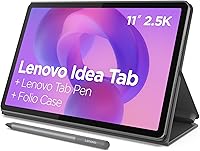
The Idea Tab 11 is the strongest fit for notes plus offline files among these choices. It combines an 11-inch 2.5K IPS display, 8 GB of memory, and 256 GB of storage with an included Lenovo Tab Pen and folio case.
Its MediaTek Dimensity 6300 processor and 90Hz display support its study-and-browsing focus. It also has quad Dolby Atmos-tuned speakers; check your calling app's requirements if family video calls are a priority.
At 1.1 pounds, it makes more sense on a desk or stand than held above your face for a whole book. Lenovo claims up to 12 hours of rated battery life; brightness, apps, and other tasks affect actual runtime.
Buy it for lecture notes, saved course documents, or a shared home tablet. Skip it if you mainly want pocketable reading or need more room to view a full document without zooming.
Who should buy the Lenovo Idea Tab Plus?
The Idea Tab Plus suits desk-based reading, study, and photos where a larger display earns its place. Its 12.1-inch 2.5K IPS screen gives documents and handwriting more room, though small source text may still need zooming.
It pairs a MediaTek Dimensity 6400 processor with 8 GB of memory, 128 GB of storage, and a 90Hz refresh rate. A Lenovo Tab Pen and folio case are included, along with quad Dolby Atmos-tuned speakers.
Lenovo claims up to 13 hours of rated battery life and specifies 45W fast charging. Don't choose it for a small claimed battery advantage alone; your screen preference matters more.
Buy it if you usually prop up the tablet and want room for worksheets or notes. Skip it for frequent one-handed reading, or if you need the Idea Tab 11's greater built-in storage.
Who should buy the Lenovo Tab One?
The Tab One suits portable reading and casual games better than document-heavy study. Its 8.7-inch HD display and 11.2-ounce weight make it the easiest of these models to carry and hold.
It has a MediaTek Helio G85 processor, 4 GB of memory, 64 GB of storage, a 60Hz screen, and dual Dolby Atmos speakers. Keep your expectations focused on a few everyday apps rather than demanding multitasking.
Lenovo claims up to 12.5 hours of rated battery life. The tablet includes a folio stand, but no pen, so don't buy it expecting the same note-taking bundle as the Idea models.
Choose it for ebooks, web browsing, and photos on trips. Skip it for dense PDFs, large handwriting pages, or frequent switching among several demanding apps.
What should you check before buying a Lenovo tablet?
Check screen comfort, storage needs, required apps, and software support first. Our guide to what to look for in a tablet computer helps turn those priorities into a buying checklist.
- Screen comfort: Measure a space on your desk or bag rather than judging size from photos.
- Storage: Count saved photos, large apps, and saved documents, then leave room for future use.
- Apps: Check essential features and paid plans before assuming a familiar app works the same on every device.
- Support: Confirm the software and security support period for the exact model.
- Accessories: Check case fit and pen compatibility before ordering extras.
The Tab One uses Android 14, and Lenovo specifies 2 years of security patches. Confirm when support ends rather than assuming that period starts on your buying date.
All 3 support microSD, but extra card space isn't extra memory and doesn't replace internal storage for every app. Read how much storage you need on a tablet before choosing a smaller capacity.
These models have Wi-Fi and Bluetooth. Plan how you'll get online away from home, and download books or recipes before leaving a reliable connection.
Are Lenovo tablets good for reading, notes, and calls?
Reading and notes are clear reasons to consider these tablets; calls need a separate compatibility check. Give your main activity priority over a long feature list.
How do you choose a screen for reading?
Choose around the material you read. Reflowable ebooks let you enlarge text, while magazines and scanned PDFs often benefit from more screen area.
A compact tablet can be easier to hold through a novel, but enlarging a fixed-layout page means more scrolling. Compare our tablets for reading and screen-size advice for reading and calls.
Use a stand for longer sessions and adjust room lighting to reduce reflections. Bigger text is often more useful than holding the screen closer.
What matters for handwritten notes?
App workflow matters as much as having a pen. The Idea models offer apps such as Squid and Nebo, but check which features require payment or an account.
Create a sample page, export it, and open it on another device before moving important notes over. Our tablets for note taking guide explains other workflow choices.
Keep original notes separate from AI summaries. Compare generated summaries with the source before relying on them for study or work.
Can you use one for video calls?
Confirm your calling app, camera, and microphone needs before buying. Screen size and Wi-Fi alone don't establish call quality, and camera details aren't available here.
The included folio stands help position the tablets on a table. Follow our tablet video-call setup guide and place a light in front of you rather than behind you.
Are Lenovo tablets good for older adults?
Yes, when readable text and simple controls match the person's needs. A larger display helps only if the tablet is comfortable to hold or supported by a stable stand.
For someone who mostly reads in a chair, prioritize grip and weight. For someone using it at a table, more screen space may matter more.
Set up the tablet with the person who'll use it. Put familiar apps on the home screen, remove unwanted shortcuts, and agree on an account-recovery method.
Our guide to making tablet text bigger covers display adjustments. The complete guide to tablets for older adults and home use helps match the device to daily routines.
How should you set up and care for a Lenovo tablet?
Install available updates, secure the account, and arrange backups before adding important files. Then adjust text size, brightness, sound, and notifications around your routine.
Use a screen lock you can remember and keep recovery details somewhere safe. For a child's Tab One, configure Family Link and Google Kids Space before handing it over.
Download only the apps you need at first. Set permission choices carefully, and check that notes or photos actually reach your chosen backup destination.
For charging, use a compatible charger and sound cable, following Lenovo's guidance. Charge on a firm surface away from direct heat, and avoid trapping the tablet under bedding.
Clean the screen with a soft microfiber cloth, keeping liquid away from ports. Clear grit from the folio before closing it, and don't pack loose keys against the display.
What mistakes should you avoid?
Avoid buying for a single headline spec. A larger display, extra storage, or longer claimed runtime helps only when it serves your actual use.
Don't confuse memory with storage: memory helps apps work, while storage holds apps and files. Closing unused apps and removing unwanted downloads address different problems.
Don't treat a folio as protection against every fall or spill. Use its stand on a stable surface and carry the tablet securely.
Don't assume an included app includes every feature forever. Check export access, subscriptions, and backup options before building your routine around it.
How does Lenovo compare with other tablet brands?
Compare exact models by the tasks you need them to handle. Lenovo's included accessories matter most when you'd otherwise need to buy a compatible pen and case separately.
For a closer comparison, read Lenovo vs Samsung tablets and whether Samsung tablets suit everyday use. Focus on apps, support, and comfortable use alongside hardware.
If you're also considering Apple, our iPad vs Android tablet guide explains ease of use for home tasks. Familiarity with an existing phone or family support can influence the choice.
So, is a Lenovo tablet good for you?
A Lenovo tablet is good when its size and tools fit your main task. Choose the Idea Tab 11 for notes and saved files, the Idea Tab Plus for larger pages, or the Tab One for lighter carrying.
Keep a laptop for work that depends on desktop tools. Use our best Lenovo tablets guide to narrow your shortlist, then compare Lenovo with Samsung if you're still choosing a brand.
Frequently asked questions
Is a Lenovo tablet good for everyday use?
Yes, a Lenovo tablet is a good choice for reading, email, and browsing if you match the model to your routine. Choose a pen bundle for handwritten notes, a larger screen for documents, or a compact model for carrying.
Check required apps and software support before buying.
Are Lenovo tablets good for older adults?
Yes, a Lenovo tablet can suit an older adult who wants books, family video calls, and simple browsing. Prioritize readable text, comfortable weight, and a stable stand over extra features.
Set up familiar apps, larger text, and account recovery together so the person can use the tablet with less help.
Is a Lenovo tablet good for note taking?
The Lenovo Idea Tab 11 and Idea Tab Plus are good options to consider for handwritten notes because both include a Lenovo Tab Pen. They also offer learning apps such as Squid and Nebo.
Before committing to an app, check its export formats, backup options, and any paid features.
Is a Lenovo tablet better than a Samsung tablet?
Neither brand is the better choice for every buyer. Compare specific models by screen comfort, storage, pen support, included accessories, and software support.
Lenovo's pen and folio bundles can suit buyers starting from scratch, but the deciding factor should be how each tablet handles your required tasks.