Lenovo Tablet vs Samsung Tablet: Which Is Better? (October 2026)
For Lenovo tablet vs Samsung tablet, choose the Lenovo Idea Tab 11 for handwritten notes and detailed documents, the Samsung Galaxy Tab A11+ for shared home browsing and family calls, or the Lenovo Tab One for travel reading. Samsung also provides a 5 MP front camera for calls, but that doesn't establish a camera advantage over Lenovo.
On this page (10 sections)
- Lenovo tablet vs Samsung tablet: which fits your daily routine?
- Which screen should you choose for books and documents?
- Which model gives you enough storage and memory?
- Is Lenovo or Samsung better for notes, calls and photos?
- When is the Lenovo Tab One the smarter choice?
- What accessories and charging details should you check?
- Do cross-device tools and AI features matter?
- How should you set up either tablet?
- What mistakes should you avoid, and how do you care for it?
- Which Lenovo or Samsung tablet should you buy?
For Lenovo tablet vs Samsung tablet, choose the Lenovo Idea Tab 11 for handwritten notes and detailed documents, the Samsung Galaxy Tab A11+ for shared home browsing and family calls, or the Lenovo Tab One for travel reading. Your main task matters more than the name on the back.
These are specific configurations, so don't apply the result to every tablet from either brand. The Idea Tab's writing bundle gives it a clear study role, while the smaller Tab One solves a different problem: carrying less.

Lenovo tablet vs Samsung tablet: which fits your daily routine?
Choose around your most frequent task, then check the tradeoffs you'll face every day. A tablet that stays on a kitchen stand needs different strengths from one you hold through a long reading session.
The Galaxy Tab A11+ fits a household tablet used for recipes, photos, browsing and calls. Skip it in favor of the Idea Tab if handwritten study notes are a central reason you're buying.
The Idea Tab 11 fits students, course learners and people who mark up documents. Skip it if you won't use the pen and mainly want a compact screen for books on the bus.
The Tab One suits a reader or traveler who wants a small personal screen. Skip it for frequent full-page documents, detailed handwriting or sharing photos with another person.
For broader brand context, read whether a Lenovo tablet is a good fit and our Samsung tablet overview. Neither brand name replaces checking the exact model and bundle.
Which screen should you choose for books and documents?
Choose the Idea Tab for detailed pages and the Tab One for easier carrying. Samsung offers the same large screen size as the Idea Tab, with less fine detail.
The Idea Tab has an 11-inch IPS display at 2560 x 1600 resolution, compared with the Galaxy Tab A11+'s 11-inch LCD at 1920 x 1200. Both reach a 90Hz refresh rate, which affects motion rather than how much detail a still page contains.
Higher resolution helps most with small print, diagrams and image detail. It won't make a poorly scanned document clear, and you may still need to enlarge text.
For novels, a reading app can usually reflow words to suit your preferred font size. Fixed-page PDFs, comics and magazines are less flexible, so a larger display saves some zooming and scrolling.
The Tab One uses an 8.7-inch HD screen at 1340 x 800 with a 60Hz refresh rate. That smaller format suits personal reading, but enlarging text leaves fewer words on each screen.
Before choosing, open a typical document on a device you already have and notice how often you zoom. Our guides to making tablet text bigger and reading books on a tablet explain useful adjustments.
Which model gives you enough storage and memory?
The Idea Tab gives you the most built-in room, while the Samsung configuration sits between the 2 Lenovo models. Choose storage around what you'll keep offline, including books, photos and documents.
The Idea Tab pairs 8 GB of RAM with 256 GB of storage; Samsung pairs 6 GB with 128 GB. The Tab One has 4 GB of RAM and 64 GB of storage.
RAM is working space for apps, while storage holds apps, downloads and files. More of one doesn't replace the other, and the operating system uses some built-in space before you add anything.
All 3 support microSD cards. Use expansion for compatible photos and files, but don't assume every app will let you store its downloads there.
A reader who mainly browses the web may need much less local space than someone who downloads course documents before traveling. Keep some storage free for app updates and temporary files rather than filling the device completely.
Our guide to choosing tablet storage helps you estimate needs. Count the files you expect to keep, then allow room for your habits to change.
Is Lenovo or Samsung better for notes, calls and photos?
The Idea Tab has the clearest advantage for handwriting; either larger tablet fits sharing photos at home. For calls, Samsung provides a known front-camera specification, but there isn't enough camera information here to rank all 3.
Is a Lenovo tablet or Samsung tablet better for handwritten notes?
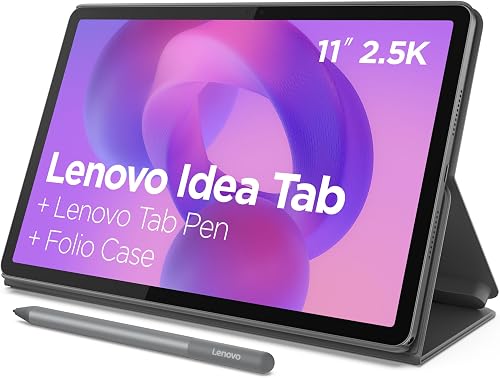
Choose the Idea Tab 11 for pen-based work because its bundle includes the Lenovo Tab Pen and a folio case. It also offers learning apps including Lenovo AI Note, Squid, Nebo and MyScript Calculator.
Those tools suit different jobs, from freehand notes to calculations. Start with one app, learn how it saves and exports your work, and add others only when you need them.
Don't treat a basic touchscreen stylus as a substitute for a supported writing pen. If handwriting is your main goal, our tablet note-taking guide explains the features to compare.
Which tablet makes sense for family video calls?
The Galaxy Tab A11+ has a 5 MP front camera, making it a practical option to consider for regular calls. Confirm the Lenovo camera details before ruling either Lenovo model in or out for that job.
Good lighting and a stable position can matter as much as a camera number. Put the main light in front of you, keep fingers clear of the lens and raise the tablet so you're looking toward the camera.
Follow our guide to video calling on a tablet for app setup. Make a short practice call before an appointment or family event so permissions and sound are ready.
Which model suits browsing and family calls at home?
Either larger model offers more screen space for browsing recipes or joining family calls on a stand, and both have quad speakers with Dolby Atmos support. The Tab One has dual Dolby Atmos speakers and makes more sense for personal reading in a smaller space.
Screen detail won't rescue a low-quality photo or weak connection during a call. Download the photos and recipe pages you need before a trip, allowing enough storage for those files.
Use headphones for calls in shared rooms and adjust the volume so you can hear comfortably. A stand also helps keep the screen visible without making you hold it through an entire family call.
When is the Lenovo Tab One the smarter choice?
Choose the Tab One when carrying comfort beats screen space. Its 11.2-ounce body is lighter than the 1.1-pound body of either larger model, before adding cases.
The included folio has a stand, so you can set it down for a book or recipe. It suits a bag you carry often more than a desk where size matters less.
For reading in bed, think about how you hold the screen. A small tablet can be easier to reposition, while a larger one may work better resting on a supported stand.
The Tab One also includes Google Kids Space and Family Link parental controls. Set up the controls yourself and review content choices rather than assuming a child-focused mode handles every decision.
Choose a larger model if your preferred text size leaves too little content visible on a small screen. Our best Lenovo tablets guide helps place this compact option alongside other choices.
What accessories and charging details should you check?
Check the whole bundle before ordering, especially the case, writing tools and compatible charger. An accessory you need immediately matters more than an extra feature you may never use.
Both Lenovo models include folio cases, and the Idea Tab also includes its pen. Samsung's included items are a data cable, ejection pin and quick start guide, so plan separately for a suitable stand or case.
Samsung requires a separately sold 25W wall charger for its stated fast charging. Use a Samsung-approved charger and USB-C cable, and replace worn or damaged charging equipment.
Lenovo quotes rated battery life of up to 12 hours for the Idea Tab and up to 12.5 hours for the Tab One. These are activity-specific estimates, not promises for a mixed day of calls, writing and downloads.
Brightness, connection strength and app use affect time between charges. Plan charging around your routine rather than choosing a tablet by a small difference between quoted battery figures.
Match cases to the exact model, including button and camera openings. A case for another tablet with the same screen diagonal may not fit.
Do cross-device tools and AI features matter?
Treat these features as useful extras after confirming compatibility. They shouldn't outweigh the screen, size or writing tools you'll use every day.
The Idea Tab offers Smart Connect for moving tasks across devices. Check support for your phone or computer before counting on it as part of your work routine.
Circle to Search is available on the Idea Tab and Galaxy Tab A11+. Samsung also offers Google Gemini, which requires internet access and has account, age, language and region restrictions.
For AI-assisted notes or summaries, compare the result with your source material before saving it as final. Keep the original document available so an omitted detail doesn't become part of your study notes.
If your goal is replacing a computer, check your required apps, file handling and typing needs first. Our guide to whether a tablet can replace a laptop helps you assess that larger decision.
How should you set up either tablet?
Set up your everyday tasks first, then simplify the home screen around them. A few deliberate choices make a new tablet easier to use than filling it with apps on day one.
Connect to trusted Wi-Fi, install available system and app updates, and add a screen lock. Check account recovery details before moving important files onto the device.
Install your reading, calling or note app and sign in while you have time to solve password problems. Download one book or document and confirm you can open it without a connection.
Adjust font size, display size and brightness in the rooms where you'll use the tablet. Bigger text can be more useful than squeezing extra information onto the screen.
For the Idea Tab, write a sample note, export it and open the exported file elsewhere. This checks your workflow before class notes or personal records depend on it.
On a shared tablet, review notifications and account access before leaving it in a common room. For a child's device, set content and spending controls before handing it over.
What mistakes should you avoid, and how do you care for it?
Avoid buying for a badge or a single specification. These tablets serve different buyers, so a higher score doesn't make one the right choice for every task.
Don't assume the Galaxy Tab's camera resolution proves it makes better calls than Lenovo. Don't assume extra RAM makes every app faster, or that a sharper display automatically makes reading more comfortable.
Keep important notes and photos backed up somewhere beyond the tablet. A microSD card adds space, but a card kept inside the same device doesn't protect against losing the whole tablet.
For cleaning, unplug the tablet and use a soft microfiber cloth. Follow the device's care guidance, avoid spraying liquid directly onto it and keep moisture out of ports.
Keep the screen and folio free of grit before closing the cover. A case helps during daily handling, but it isn't a reason to leave the tablet near spills or balance it on an unstable surface.
Store the pen where you can find it and keep charging cables away from walkways. Small habits prevent interruptions that no processor or display specification can solve.
Which Lenovo or Samsung tablet should you buy?
For this Lenovo tablet vs Samsung tablet decision, match the model to a task you'll do several times a week. That gives you a firmer reason to buy than a brand preference alone.
Choose the Galaxy Tab A11+ for a shared home screen used for recipes, browsing and family calls. Budget for the accessories needed to make its regular spot comfortable.
Choose the Idea Tab 11 for handwritten learning and detailed documents. Its writing bundle earns its place when you'll use the pen regularly, not leave it in a drawer.
Choose the Tab One for portable reading and casual browsing. Accept the smaller workspace in return for a tablet that's easier to pack.
For more choices within each brand, browse our best Samsung tablets and best Lenovo tablets. If none fits your main task, compare the broader best Android tablets for everyday use before deciding.
Frequently asked questions
Is a Lenovo tablet better than a Samsung tablet?
Choose by model and task rather than brand alone. The Lenovo Idea Tab 11 suits handwritten notes because it includes a pen and folio, while the Samsung Galaxy Tab A11+ suits shared browsing and calls.
Lenovo's smaller Tab One makes more sense when carrying comfort matters most.
Which has the better screen, Lenovo or Samsung?
The Lenovo Idea Tab 11 has the sharper screen in this comparison, with 2560 x 1600 resolution versus Samsung's 1920 x 1200. Both larger models reach 90Hz.
Choose Lenovo for detailed documents, but adjust text size too: extra pixels don't automatically make small words easier to read.
Which tablet is better for video calls?
The Samsung Galaxy Tab A11+ is a practical call-focused option with a 5 MP front camera and a large screen. That camera specification doesn't prove it beats either Lenovo.
Also check your calling app, room lighting, Wi-Fi connection and stand position before deciding which tablet fits your calls.
Do Lenovo and Samsung tablets support expandable storage?
All 3 tablets here support microSD storage. A card can provide room for compatible downloads and personal files, but it doesn't add RAM or guarantee that every app can move onto it.
Check card compatibility and your apps' download settings before relying on expansion instead of built-in storage.
Which Lenovo tablet is easiest to carry?
The Lenovo Tab One is the easiest of these Lenovo models to pack, with an 8.7-inch screen and an 11.2-ounce body. Its included folio adds a stand for reading away from home.
Choose the larger Idea Tab instead if you regularly read fixed-page PDFs or need more writing space.